The Idea
I’ve been poking at the 6502 for years: a Replica-1, Ben Eater’s breadboard computer, an emulator to run them on. The OO-1 is where that goes next: a computer of my own, built on a backplane so every part of it is a card I can pull out and look at.
The OO-1 runs a W65C02S at 7.16 MHz with a full megabyte of RAM. That’s a lot more than a 6502 can address, so a “north bridge” card maps four 16 KB windows onto it. Video, sound, storage, serial and USB are all cards, and the storage cards can move data by DMA without bothering the CPU. And because one crystal clocks everything, it can slow itself down to exactly an Apple II’s speed and run Apple IIe software unchanged.
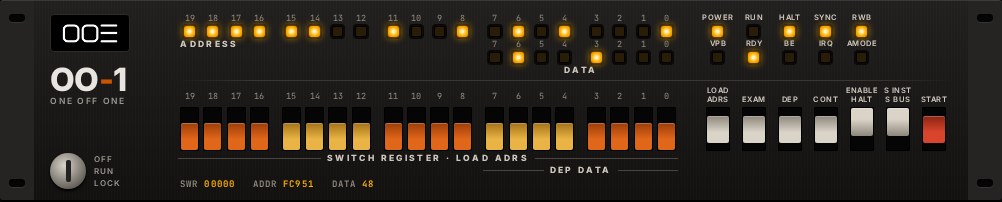
On the front there’s a front panel, PDP-11 style: a lamp for every address and data line, a row of switches to type addresses in by hand, and HALT, STEP and DEPOSIT switches. Nobody needs one in 2026. I want one anyway.
Try It
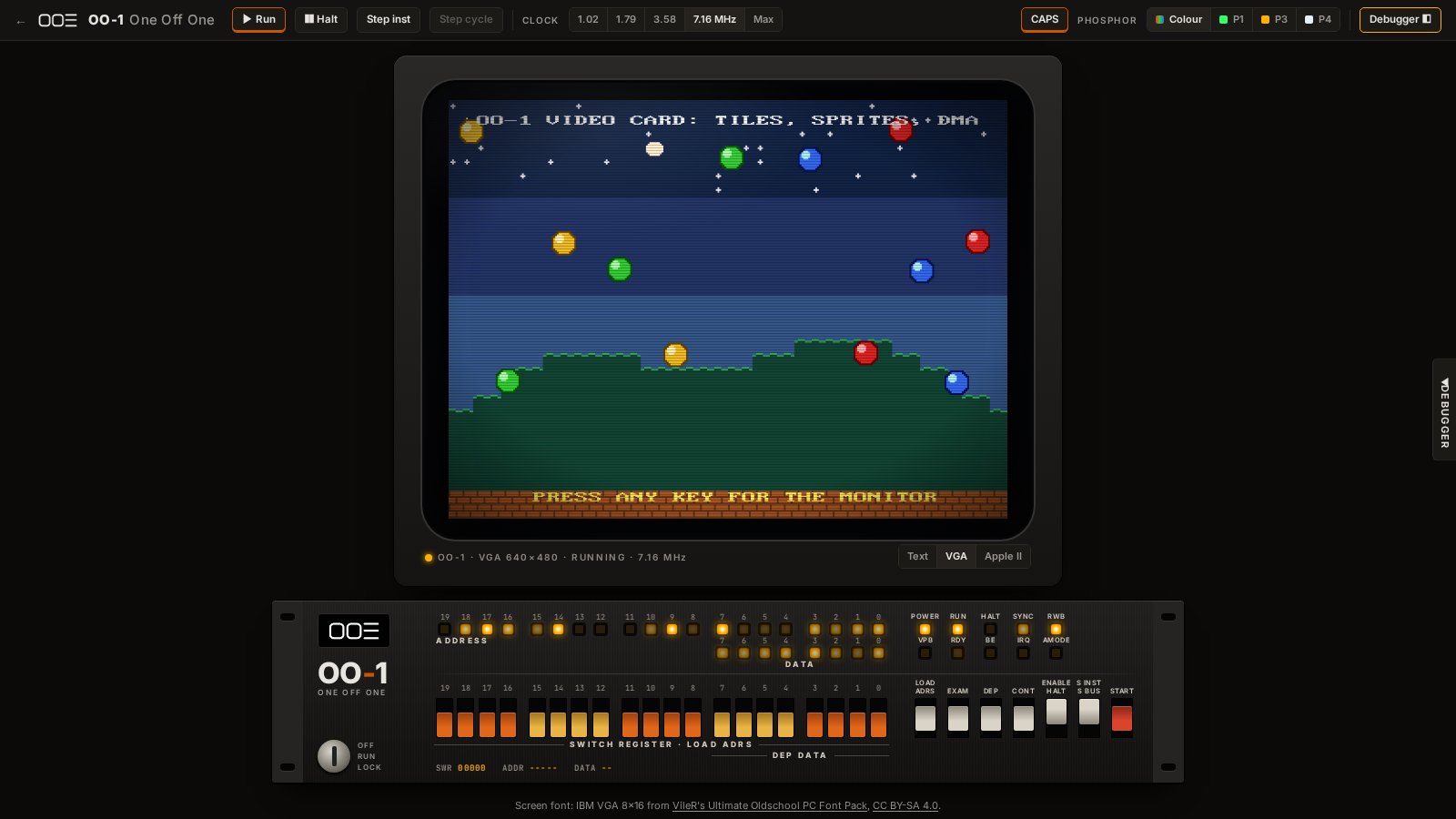
The hardware is still on paper. The emulator isn’t: it runs the OO-1’s BIOS, its video card, the front panel and a debugger right here in your browser.
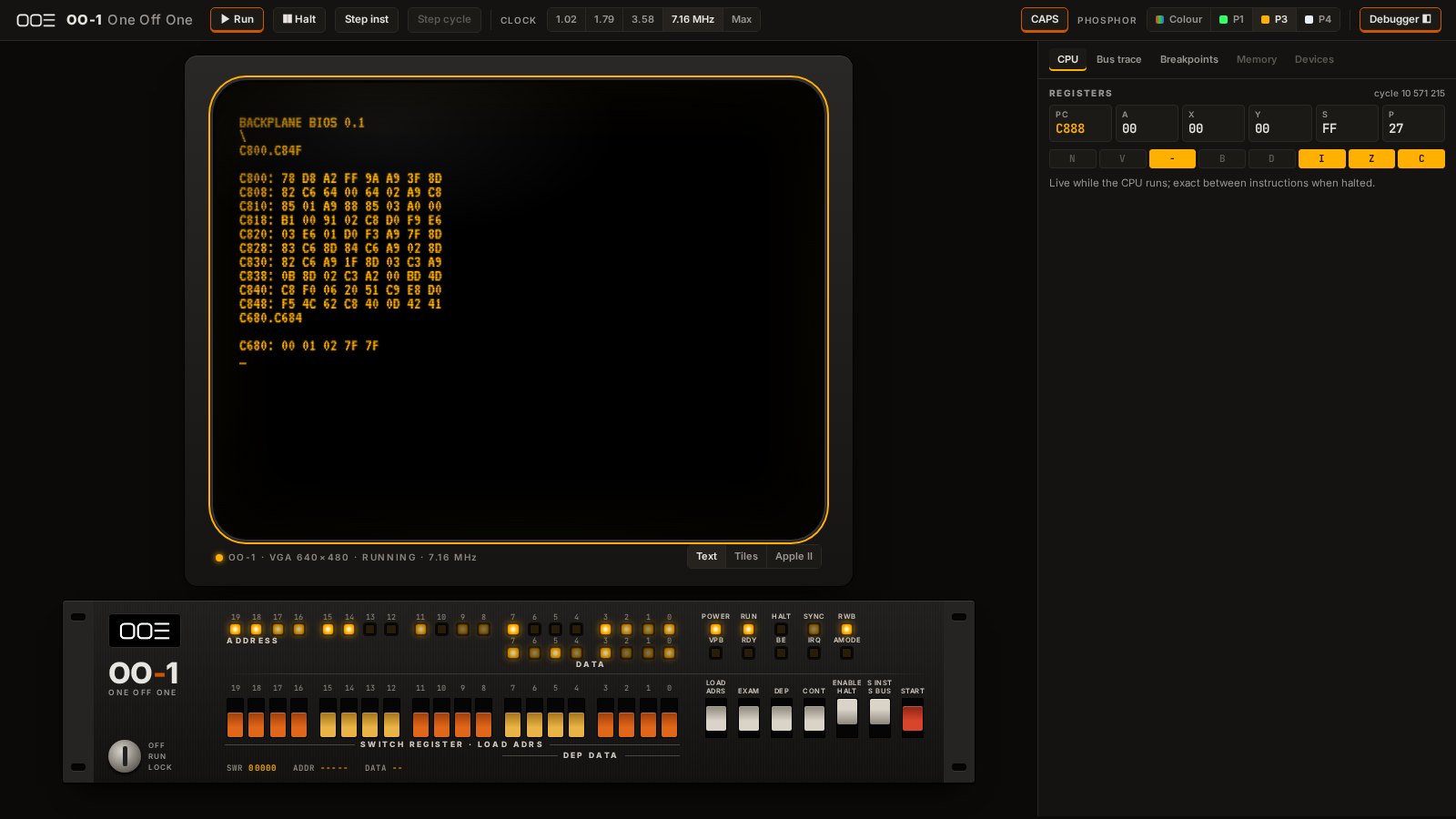
Click the screen and type. It boots into the Woz Monitor, the same one the Apple I shipped with:
C800.C84Fdumps the start of the BIOS.C680.C684shows where the four memory windows point.300: A9 41 20 51 C9 4C 00 03, then300R, printsAs forever. Halt stops it, Step goes one instruction at a time, and Run lets it go again: on the toolbar, or with the front panel’s HALT and CONT switches, the way you would on the real thing.
The VGA button under the screen switches the monitor to the video card, where the BIOS
mirrors everything in the original IBM VGA font. There your keyboard and mouse become the OO-1’s
own USB keyboard and mouse, so the VGA screen is a whole computer, no serial terminal needed.
C803R runs the video demo: a scrolling landscape of tiles, a dozen bouncing sprites whose
positions are copied to the card by DMA every frame, and a palette fade. Any key brings the
monitor back, and Pause/Break breaks into it from anything.
The sound card is two SIDs, the Commodore 64’s sound chip, with a 6510 of their own to run the music, so a tune plays without the main CPU lifting a finger. Sound under the screen turns your speakers on, for the SIDs and for the IIe’s own speaker in Apple II mode, which beeps as you start it, and plays Apple II software’s beeps and tunes. To make a note yourself, type these into the monitor, one per line:
C540: 10sends SID A’s writes to SID B as well, so you hear it in both speakers.C500: 00 10 00 00 11 00 F0sets up voice 1: its pitch, a triangle wave, and the gate.C518: 0Fturns the volume up.C518: 00turns it down again.
Play .sid… plays a C64 tune of your own (the HVSC has tens of thousands) straight onto the card: pick the file, step through its songs, Stop. Most tunes play; RSIDs, which expect a whole C64 around them, mostly stay quiet. The file is read in the page and never kept or uploaded.
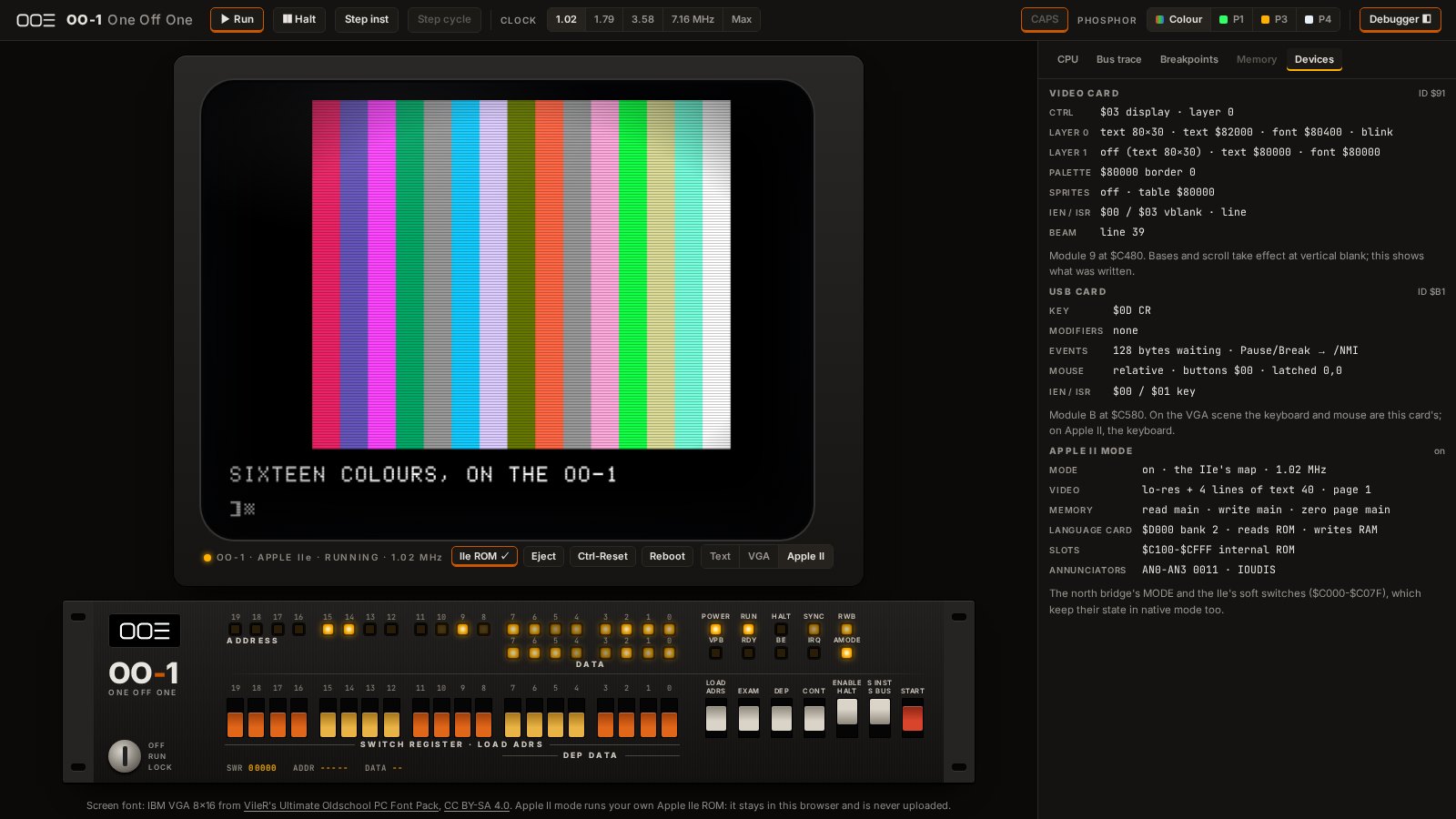
Apple II mode needs one thing I can’t give you: an enhanced Apple IIe’s ROM, which is Apple’s. If you have one (dumped from your own machine, say), Insert IIe ROM… under the screen takes it: the 16 KB ROM, or its two 8 KB halves, and the video ROM if you have it. It stays in your browser and is never uploaded. Start Apple IIe hands the machine over: the clock drops to the Apple’s 1.02 MHz, the AMODE lamp lights, and the screen becomes a IIe’s. Type into Applesoft, or paste a program in. Ctrl-Delete is Ctrl-Reset, and the left and right Alt (Option) keys are Open Apple and Closed Apple.
To boot a disk, the card needs its two 256-byte PROMs (the boot ROM, 341-0027, and the state
machine, 341-0028); pick them with Insert IIe ROM… too. Insert disk… under the monitor
takes a .woz, .dsk, .do or .po, and Start Apple IIe boots it, the drive’s light
coming on while it loads. Whatever a program writes goes back to the disk; the page keeps your
last disk in your browser, and Save downloads it, changes and all. Without a disk the IIe
waits for one forever, as a real one does: Ctrl-Reset drops you into BASIC.
The debugger on the right shows the registers and the bus, cycle by cycle, and its Devices tab
takes the video, USB and sound cards apart while they run (down to each voice’s envelope), and in Apple II mode the IIe’s switches and the Disk II’s head, motor and magnets too. To catch the CPU in
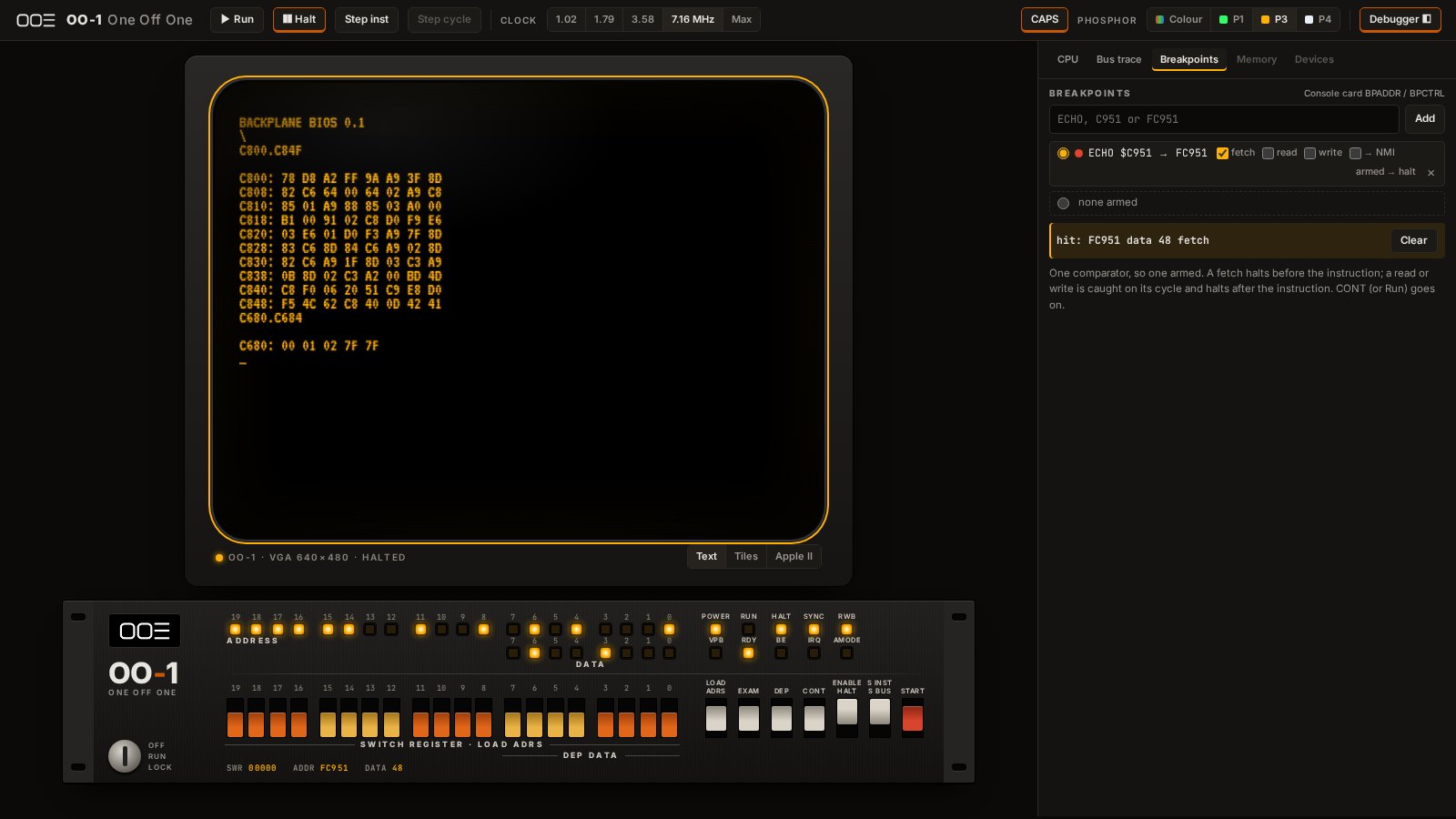
the act, open Breakpoints, add ECHO, and type a key: it halts just before printing it, and the
lights on the panel show the same address.
How It’s Made
Everything is in the open, in the 6502 repo on GitHub:
- The design (hw/design.md): the bus, the memory map, every card’s registers, and the reasons for each decision.
- The emulator: C++17, cycle by cycle, built to that design so the software can be written before the boards exist. It’s compiled to WebAssembly for the page above.
- The BIOS: 65C02 assembly, built with cc65. Its screen font is IBM VGA 8×16 from VileR’s Ultimate Oldschool PC Font Pack, used under CC BY-SA 4.0.
Whether the real thing comes out as tidy as the emulator remains to be seen.
Follow Along
This one is being built live too.
Live builds happen on Twitch. Come watch, ask questions, or point out which wire I got wrong.
Discussion happens on Discord. If you’re building something 6502-shaped yourself, that’s the place.
Gallery
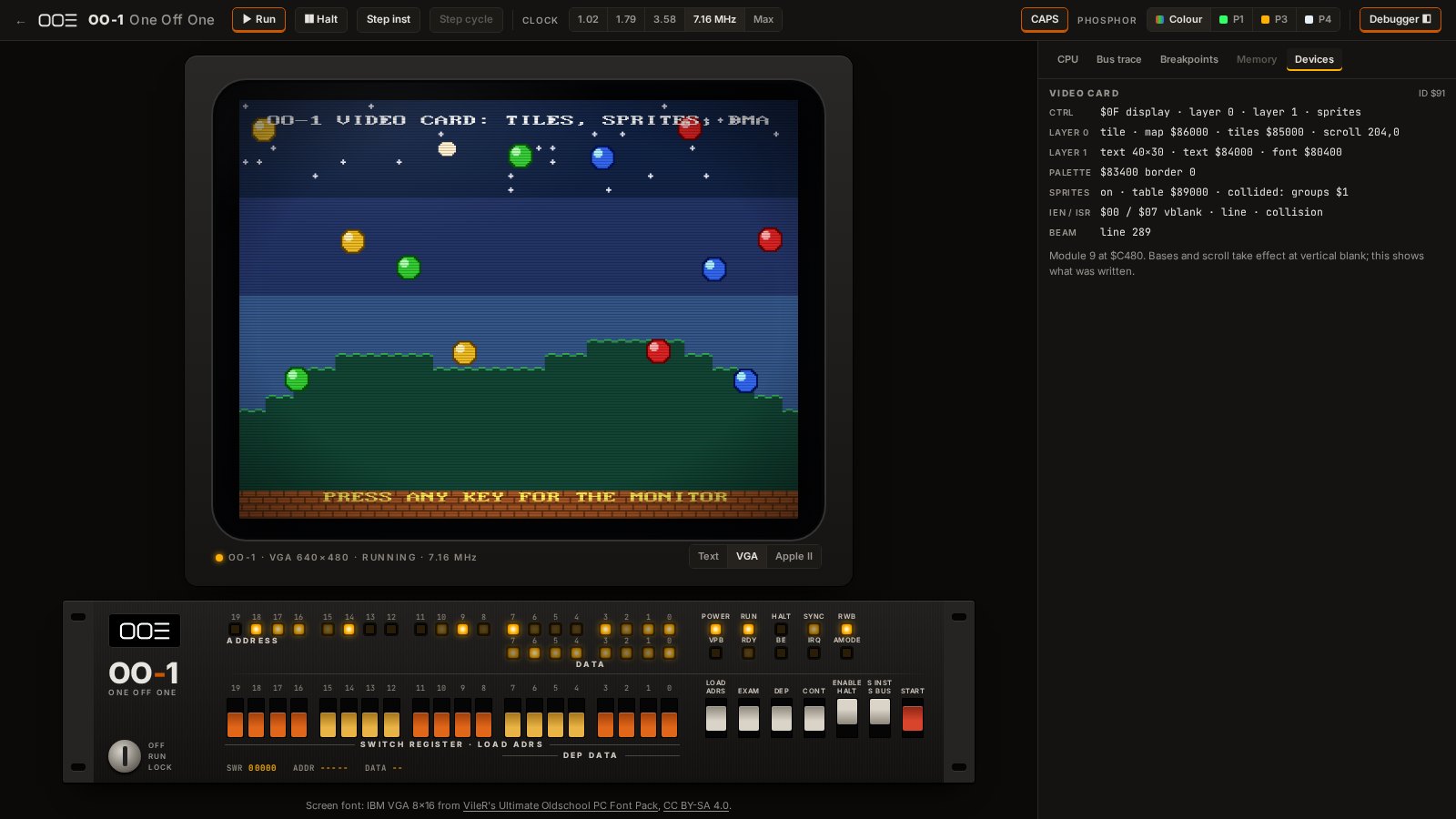
The video demo: tiles, sprites, scrolling and DMA, with the card's registers in the debugger
Apple II mode: Applesoft drawing the IIe's sixteen lo-res colours
The workbench: the Woz Monitor on the CRT, the front panel, and the debugger
A breakpoint on ECHO: the CPU halts before the character is printed
The front panel, rack-mounted, with lights for every address and data line
Specifications
- CPU
- W65C02S at 7.16 MHz (a 14.31818 MHz crystal, divided by 2)
- Memory
- 1 MB of RAM, seen through four 16 KB windows
- Bus
- Backplane: 20-bit address, cards picked by module ID, DMA
- Front Panel
- Switch register, address and data lights, single step, breakpoints
- Video
- VGA 640×480: text, bitmaps, two tile layers, 64 sprites
- Input
- USB keyboard and mouse, Apple-style game port
- Sound
- Two SIDs with a 6510 of their own, for C64 tunes
- Apple II Mode
- An enhanced Apple IIe at 1.02 MHz, with a Disk II drive, on your own IIe ROM
- Emulator
- C++17, compiled to WebAssembly
- License
- MIT
- Source
- github.com/jeffersonjhunt/6502
The writing on this page was done with help from Claude. The ideas, opinions, and questionable design decisions are all mine. More on that.